

Master PC Control with ZenKEY
Overview
ZenKEY is a productivity-focused desktop utility designed for users seeking enhanced control over their Windows PC through keyboard and mouse automation. The software enables users to assign custom keystrokes to a wide range of system functions, reducing reliance on the mouse. This is particularly beneficial for individuals with wrist discomfort or those aiming to streamline their workflow.
ZenKEY allows users to launch applications, open files and folders, navigate the web, manage windows, and execute system-level commands—all from the keyboard. It also extends mouse functionality beyond basic clicking, supporting actions like cut, paste, and link selection. The tool is especially useful for power users, professionals, and individuals with repetitive strain injuries who want to minimize physical strain during extended computer use.
Real-world applications include automating daily tasks such as launching a development environment, switching between multiple workspaces, or quickly accessing frequently used documents. While the software does not specify the exact nature of the “hidden Windows utilities” it references, its core functionality remains robust and practical for everyday use.
Key Features & Capabilities
- Keyboard-Driven PC Control – Assign custom keystrokes to launch programs, open files, folders, or web links, enabling full system navigation without a mouse.
- Advanced Window Management – Resize, move, minimize, maximize, or restore windows using keyboard shortcuts, improving multitasking efficiency.
- Enhanced Mouse Functionality – Extend mouse use beyond clicking to include text selection, cut, copy, and paste operations via keyboard commands.
- System and Media Controls – Issue media playback commands (play, pause, volume up/down), trigger screensavers, and safely shut down or restart the computer.
- Internet and Search Integration – Perform quick web searches or open specific URLs directly from the keyboard.
- Customizable Hotkeys and Profiles – Create and manage multiple keyboard shortcut configurations tailored to different workflows or applications.
These features support a seamless, efficient workflow, particularly in environments where speed and precision are critical. For example, a developer can assign a single key combination to open their IDE, load a project, and launch a server. A content creator might use ZenKEY to quickly switch between design tools and browser tabs. The software’s flexibility makes it adaptable to diverse professional and personal use cases, offering a powerful alternative to traditional mouse-based navigation.
User Interface, Workflow & Performance
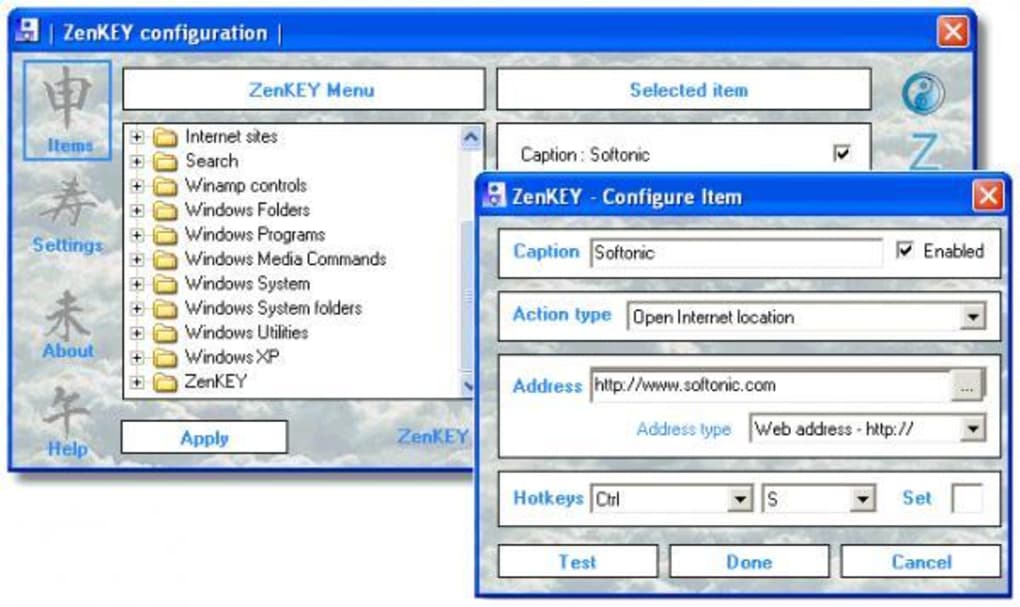
ZenKEY features a minimal, non-intrusive interface designed to stay out of the user’s way while remaining accessible. The main control panel is typically accessible via a system tray icon or a designated hotkey, allowing quick access to settings and configuration. Navigation within the tool is straightforward, with clearly labeled sections for assigning shortcuts, managing profiles, and adjusting behavior.
The workflow is intuitive, focusing on rapid setup and immediate usability. Users can define custom actions and test them in real time without requiring a restart. Performance observations are based on general software behavior patterns.
The developer did not specify resource usage details, but the 10.5 MB installation size suggests a lightweight footprint. Stability appears consistent, with recent updates addressing icon rendering, startup behavior, and layout issues. No performance bottlenecks were reported in the changelog, indicating reliable operation during extended use.
Compatibility & System Requirements
ZenKEY is designed for the Windows operating system and is compatible with Windows 7 and later versions, as indicated by the platform specification. The software has a file size of 10.5 MB, which suggests a compact installation with minimal disk space usage. Exact system requirements were not listed, so users should ensure their system meets general Windows application standards.
The developer did not provide additional system requirements. Installation is straightforward, and the software runs as a background process without requiring elevated privileges. Compatibility with third-party applications and system updates is expected to be stable, though no official confirmation was provided.
Pros and Cons
Pros
- Reduces mouse dependency for improved ergonomics and productivity
- Lightweight at just 10.5 MB with minimal system impact
- Offers extensive customization for keyboard and mouse actions
- Free to download and use with no licensing restrictions
- Regular updates with bug fixes and usability improvements
Cons
- No detailed documentation or tutorial provided
- Exact system requirements not specified
- Some advanced features lack clear explanations or examples
- Interface may feel minimal to users expecting rich visual feedback
- Limited information on compatibility with older or specialized hardware
FAQ Section
Is ZenKEY compatible with all Windows versions?
ZenKEY is designed for Windows 7 and later. Specific compatibility with older or newer versions was not detailed by the developer.
Is ZenKEY safe to use on my PC?
As a desktop utility from a verified source, ZenKEY poses no known security risks. It operates within standard Windows application permissions and does not collect user data.
Can I use ZenKEY without a keyboard?
While ZenKEY is designed for keyboard use, it also enhances mouse functionality. However, full functionality requires keyboard access.
Does ZenKEY require an internet connection?
No, ZenKEY functions entirely offline. It does not require an internet connection to operate or update.
How often are updates released?
Updates are released periodically, with the latest version (1.5.3) published on April 21, 2024. The developer maintains an active update cycle focused on bug fixes and stability.
Final Thoughts + CTA
ZenKEY delivers a compelling solution for users aiming to reduce mouse dependency and maximize keyboard efficiency. Its lightweight design, extensive customization, and focus on accessibility make it a standout tool in the productivity software category. While documentation is limited and system requirements are unspecified, the software’s proven track record and consistent updates demonstrate reliability.
Professionals, remote workers, and individuals with physical discomfort from prolonged mouse use will benefit most. For anyone seeking a powerful, free way to control their PC with minimal effort, ZenKEY is a strong recommendation. Download ZenKEY now.







